
Choose the calculation period in the indicator settings.
Indicators / Order flow
ATAS / VB × FB
VB × FB
See where market activity concentrates.
High-volume and POC zones with Absorption, Imbalance, Elephant Absorption and Delta Divergence signals in one ATAS indicator.
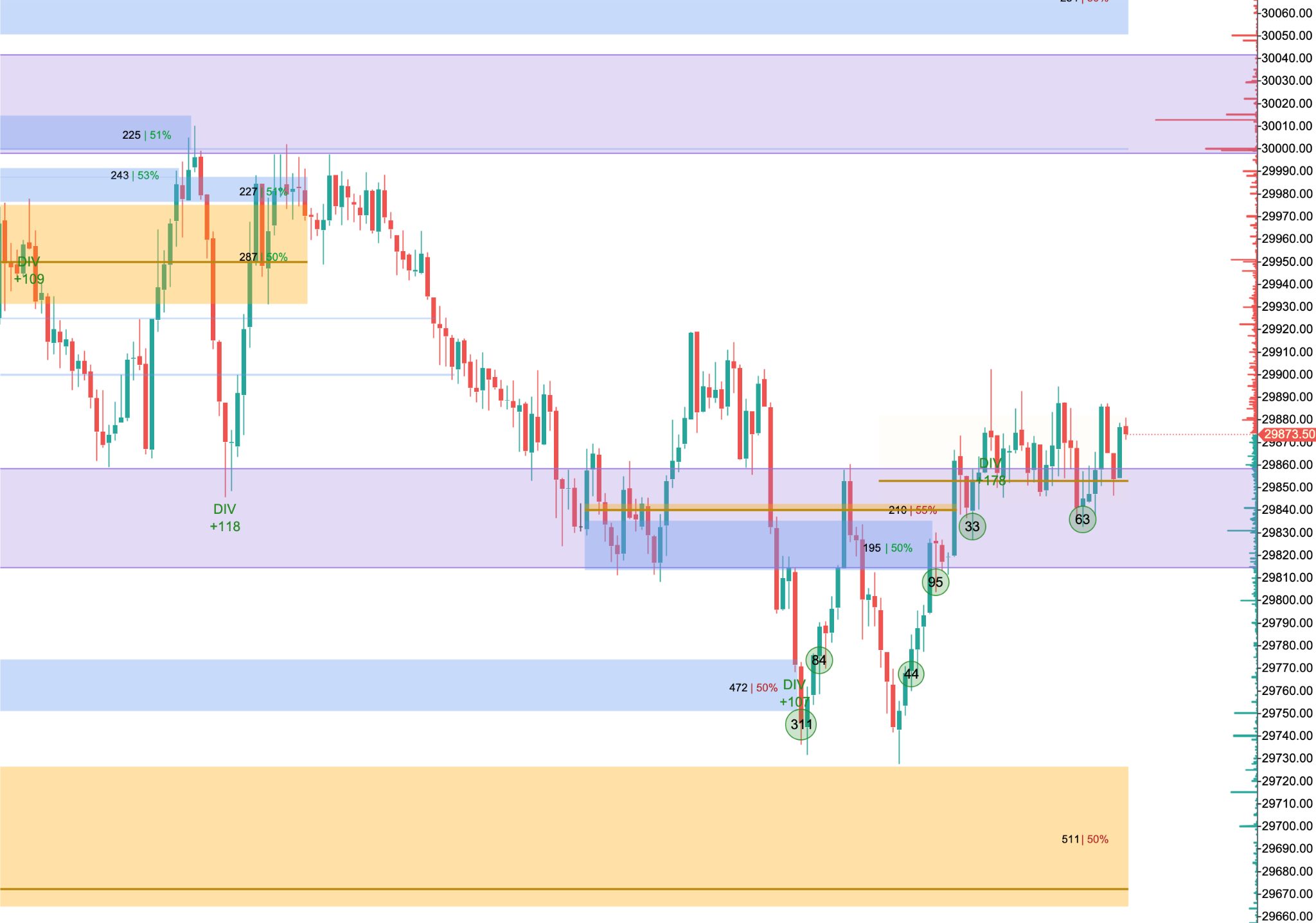
Actual chart screenshot
01 / FEATURES
What does this indicator offer?
- 01Uses actual executed volume at each price.
- 02HVN zones with the POC zone highlighted in gold.
- 03Order-flow signals with independent settings.
- 04M Tesla zones independent of volume zones.
- 05Selectable calculation period; default 4 hours from the ATAS trading-day opening.
- 06Volume labels on by default, with adjustable colors, opacity and alerts.
02 / INSIDE THE CHART
A closer look at the chart.
Video walkthrough
VIDEO GUIDE
Video guide in preparation.
A chart walkthrough of the indicator will appear here.
03 / HOW TO USE
Start with these steps.
Adjust zones and signals. Set Minimum circle volume to filter Elephant Absorption circles; zero removes the minimum.
Watch how price interacts with completed zones.
Completed zones retain their formation-period data. Live candle signals may change until the close.
SETTINGS / VB × FB
Settings to get started.
Volume Profile
Time Frame is the first setting. The default is 4 H, with periods anchored to the ATAS trading-day opening. It is independent of the chart timeframe.
Elephant Absorption
Circles show volume, with black text by default. Minimum circle volume starts at zero. Set it to 500, for example, to show circles with at least 500 volume; all other detection rules still apply.
M Tesla
An independent section to show, hide and recolor its zones. Calculation uses Default, without Scale Mode or Auto ATR.
SUBSCRIPTION / ACTIVATION
From subscription to activation.
Your account
Register with your email and password, verify your email, then access your dashboard.
Payment
Choose a plan and USDT network, transfer to the address in your order, then submit the transaction hash for manual review.
ATAS license
After payment confirmation, submit your ATAS username. We activate the indicator, then your subscription term starts on confirmed activation.
Does the price cover every indicator?
Each plan covers the selected indicator only. ATAS and market data subscriptions are separate.
Does the subscription start when I transfer funds?
It starts when activation is confirmed. Your dashboard shows the start and expiry dates.
Does my subscription renew automatically?
Renewal is manual with a new payment. The website never automatically debits your wallet.
Should I send my ATAS password?
We only need your username. Do not send your password.
04 / VB × FB MEMBERSHIP
Plans for VB × FB
This subscription covers this indicator only. The term starts after activation is confirmed.
VB × FB
One month
300USD / كامل المدة
- Indicator VB × FB
- Activation on your ATAS account
- Duration: One month
VB × FB
3 months
800USD / كامل المدة
- Indicator VB × FB
- Activation on your ATAS account
- Duration: 3 months
VB × FB
6 months
1400USD / كامل المدة
- Indicator VB × FB
- Activation on your ATAS account
- Duration: 6 months
VB × FB
One year
2500USD / كامل المدة
- Indicator VB × FB
- Activation on your ATAS account
- Duration: One year